中国版OpenClaw,如何玩转Prometheus实战
摘要
本篇文章,以使用mcp 接入prometheus为例,演示接入prometheus后对指标的NL自然语言问数,设置定时任务巡检,以及对告警的处理和推送等作业场景。更多的场景等你来发现!!
前言
OpenOcta 可以使用npx,docker,uv等方式启动mcp server,或者直接连接远程mcp server,以便Agent通过标准协议调用外部工具,比如Prometheus / ElasticSearch 等存储引擎。
OpenOcta 对外暴露三个webhook endpoint ,提供了一个alert告警端口,允许接入第三方的信息。

- 运行prometheus server服务,以及Alert manager服务;
- 运行OpenOcta所在的环境和Prometheus Server以及Alert Manager Server 网络通信无障碍;
- 为了快速启动,使用npx方式启动prometheus server ,要求本地有node环境以及安装了npx;
- 飞书配置了企业内应用机器人。
配置样例:
可以使用配置快速拉起该演示样例,注意替换对应的APIKey,appId,appSecret等配置内容
{
  "mcp": {
    "servers": {
      "prometheus_test": {
        "enabled": true,
        "command": "npx",
        "args": [
          "prometheus-mcp@latest",
          "stdio"
        ],
        "env": {
          "PROMETHEUS_URL": "http://192.168.50.59:9090"
        }
      }
    }
  },
  "env": {
    "vars": {
      "KIMI_API_KEY": "sk-......",
      "KIMI_BASE_URL": "https://api.kimi.com/coding/"
    }
  }
}
01
启动OpeOcta进行对话
这里简单输入之后,可以看到已经开始调用工具进行查询指标,然后开始分析
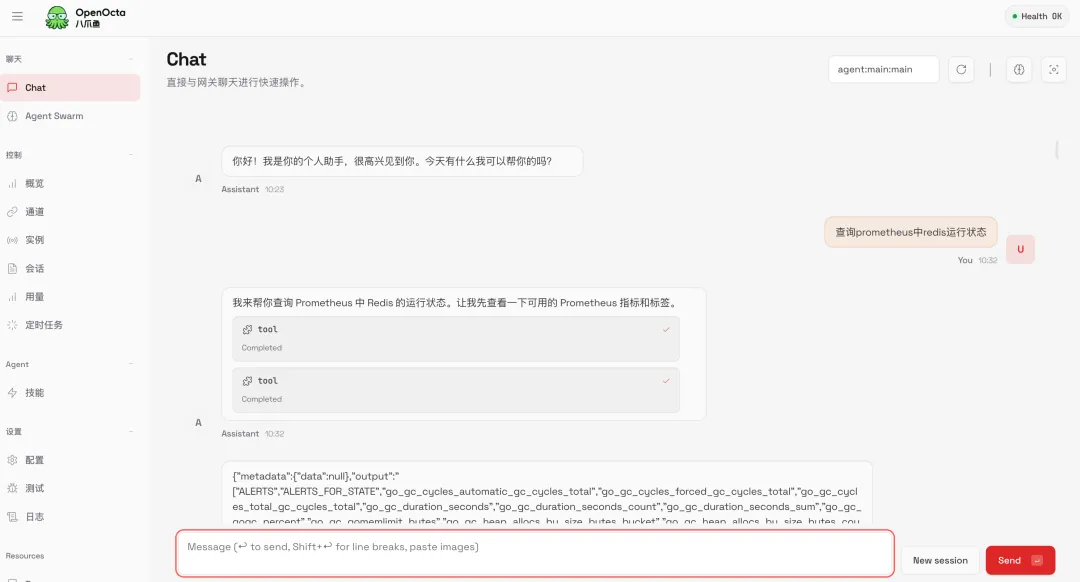
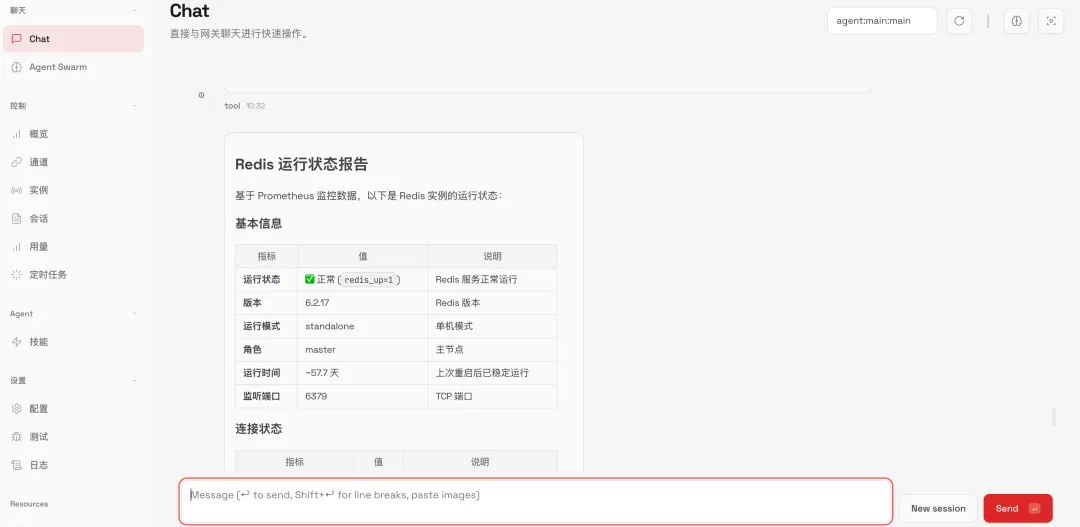
查询结果:
02
设置定时任务巡检
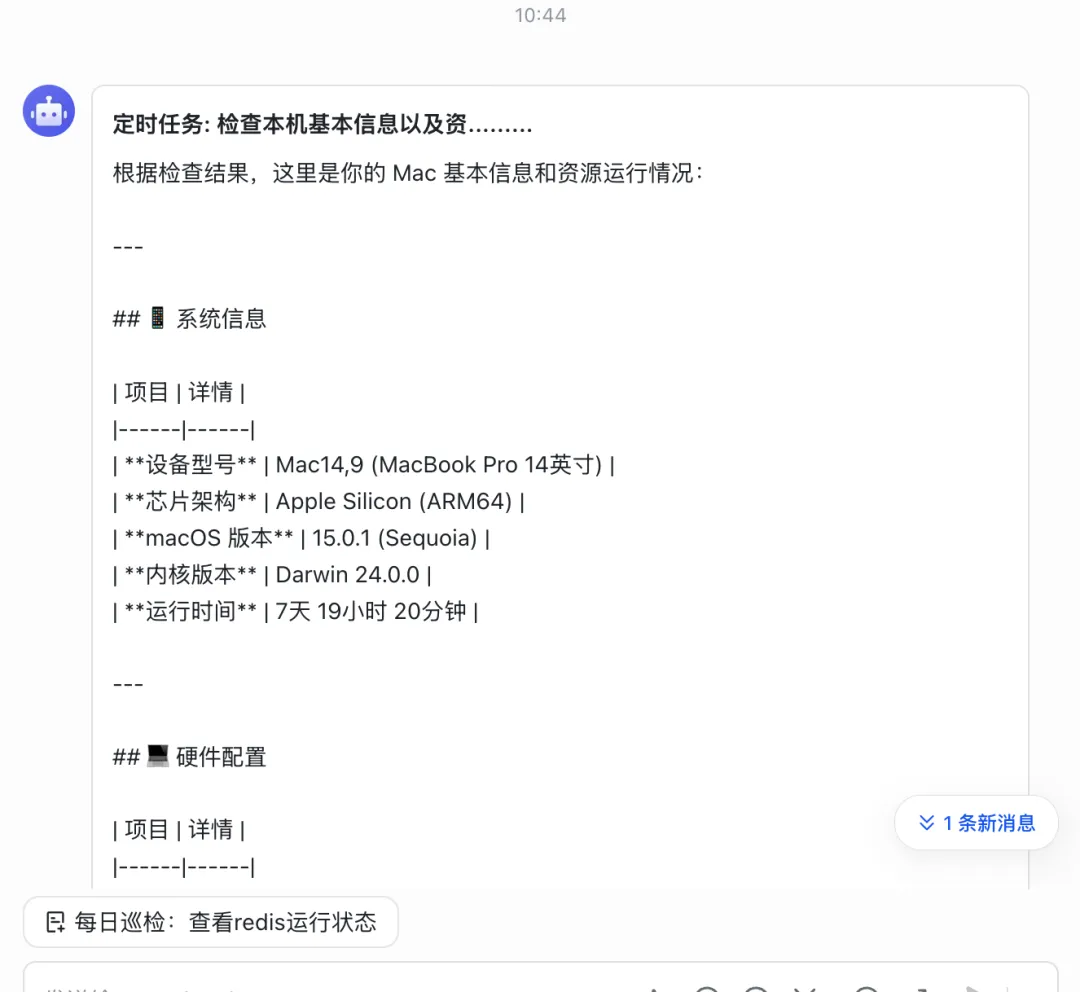
配置定时任务,并推送消息到飞书消息渠道:
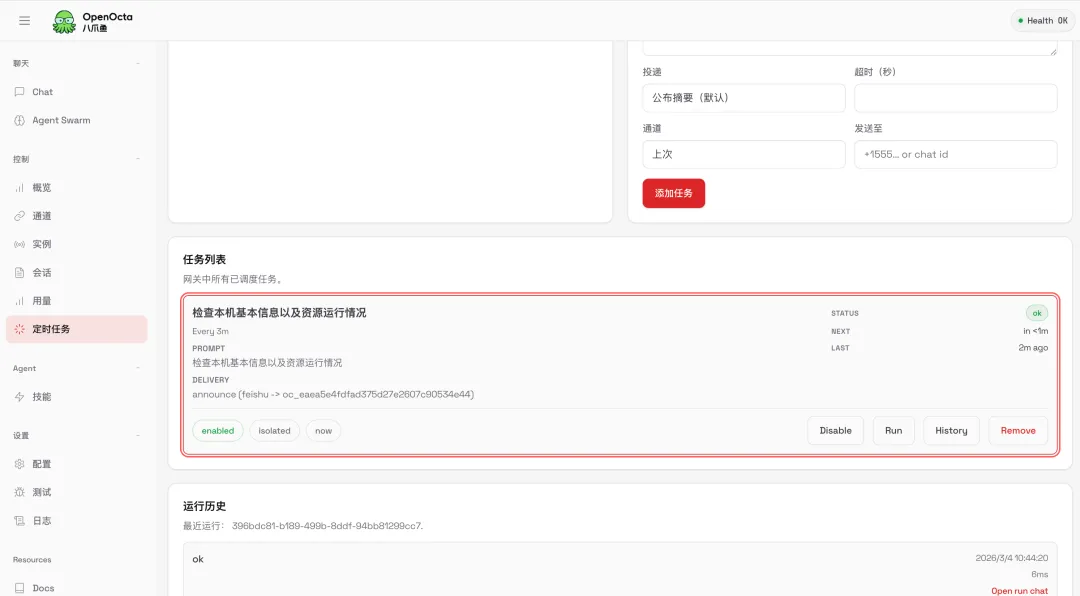
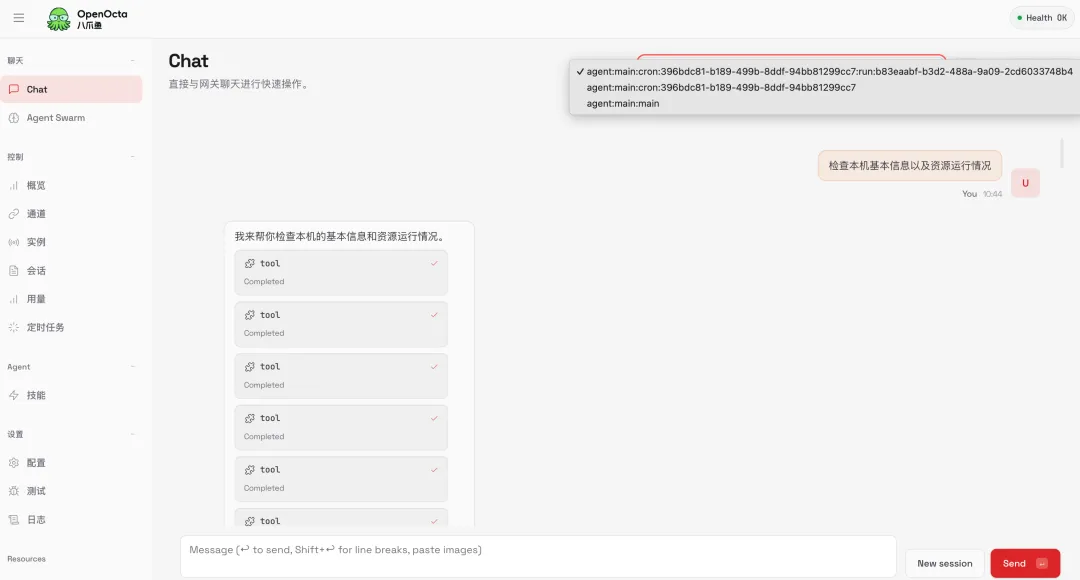
点击定时任务 History → Open run chat 查看 对话过程
查看飞书消息推送内容,由于飞书对于文本内的表格等内容限制,OpenOcta统一使用文本推送消息。
03
配置Prometheus告警推送
由于Prometheus alert告警推送内容格式比较固定,可能缺乏对应的prompt,OpenOcta对外暴露了一个alert 的webhook endpoint ,允许直接推送告警信息。
3.1 配置Prometheus alert告警:
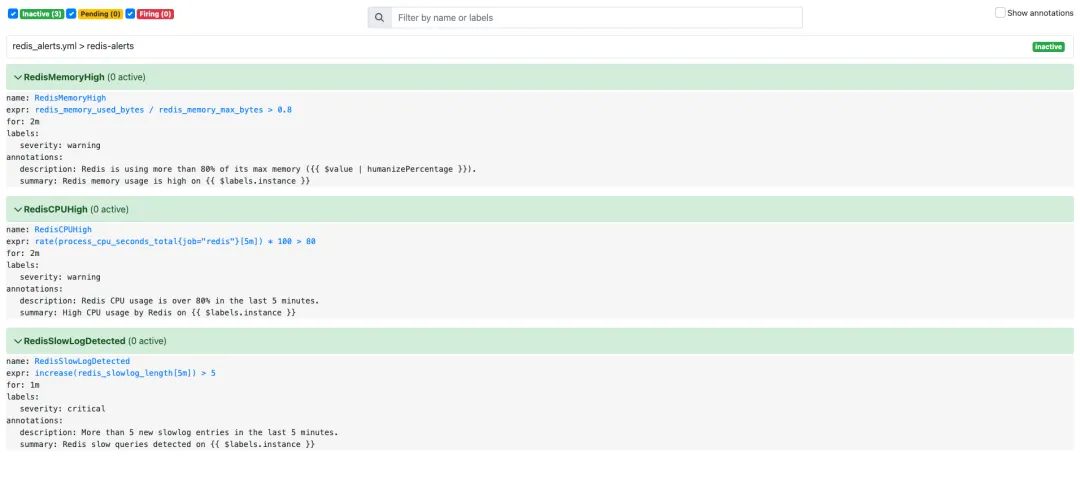
Prometheus Server 目录下创建:redis_alerts.yaml文件。这里配置内存,CPU,慢日志,三个常见告警规则
groups:
  - name: redis-alerts
    rules:
      # Redis 内存使用率 > 80%
      - alert: RedisMemoryHigh
        expr: redis_memory_used_bytes / redis_memory_max_bytes > 0.8
        for: 2m
        labels:
          severity: warning
        annotations:
          summary: "Redis memory usage is high on {{ $labels.instance }}"
          description: "Redis is using more than 80% of its max memory ({{ $value | humanizePercentage }})."

      # Redis CPU 使用过高(需 node_exporter 提供)
      - alert: RedisCPUHigh
        expr: rate(process_cpu_seconds_total{job="redis"}[5m]) * 100 > 80
        for: 2m
        labels:
          severity: warning
        annotations:
          summary: "High CPU usage by Redis on {{ $labels.instance }}"
          description: "Redis CPU usage is over 80% in the last 5 minutes."

      # Slowlog 条目数在过去5分钟内新增超过5条(需 exporter 支持)
      - alert: RedisSlowLogDetected
        expr: increase(redis_slowlog_length[5m]) > 5
        for: 1m
        labels:
          severity: critical
        annotations:
          summary: "Redis slow queries detected on {{ $labels.instance }}"
          description: "More than 5 new slowlog entries in the last 5 minutes."
最终在prometheus server页面可以看到如下告警配置:
3.2 配置Alert Manager 推送告警信息:
global:
  resolve_timeout: 5m

route:
  group_by: ['alertname']
  group_wait: 30s
  group_interval: 5m
  repeat_interval: 1h
  receiver: 'redis-webhook'

receivers:
  - name: 'redis-webhook'
    webhook_configs:
      - url: 'http://192.168.50.230:18900/hooks/alert'
        send_resolved: true
3.3 模拟告警
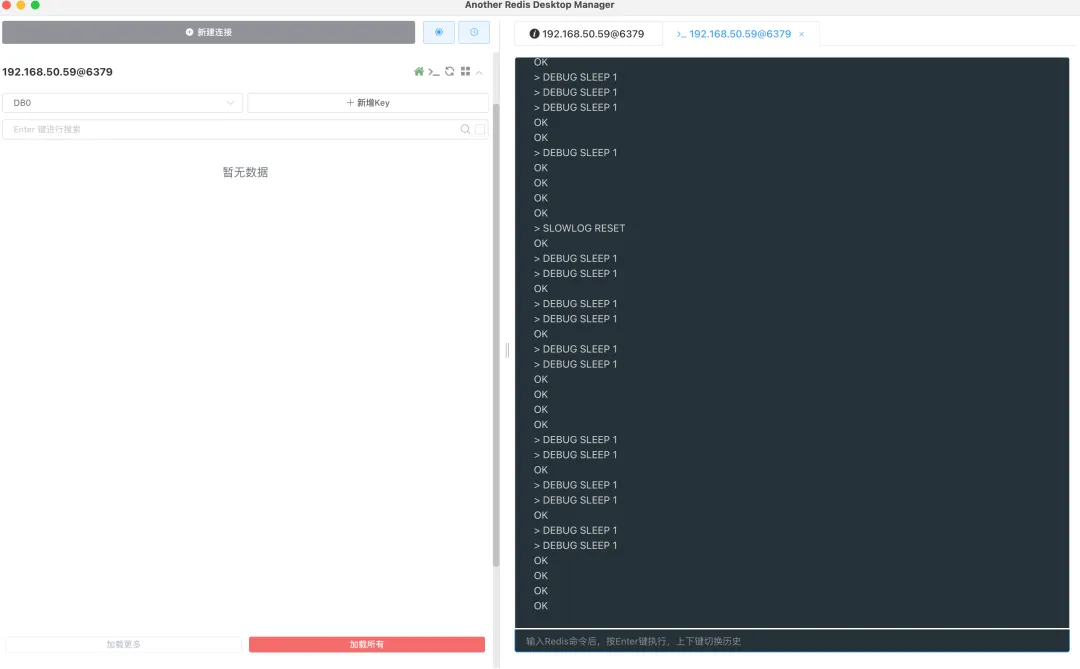
手动执行DEBUG SLEEP 1 ,制造SlowLog
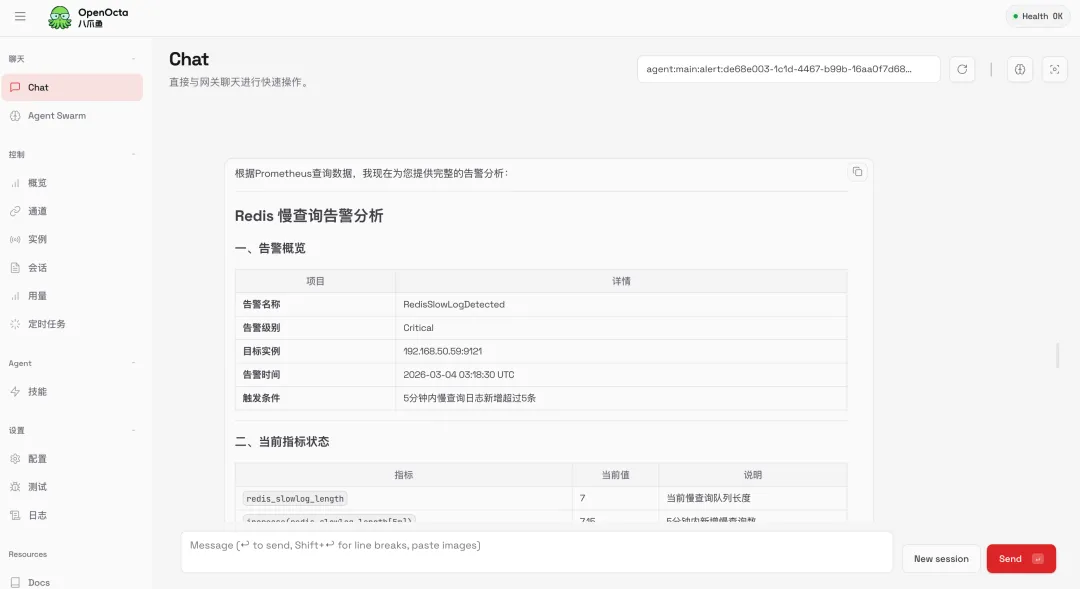
3.4 查看 OpenOcta 告警分析
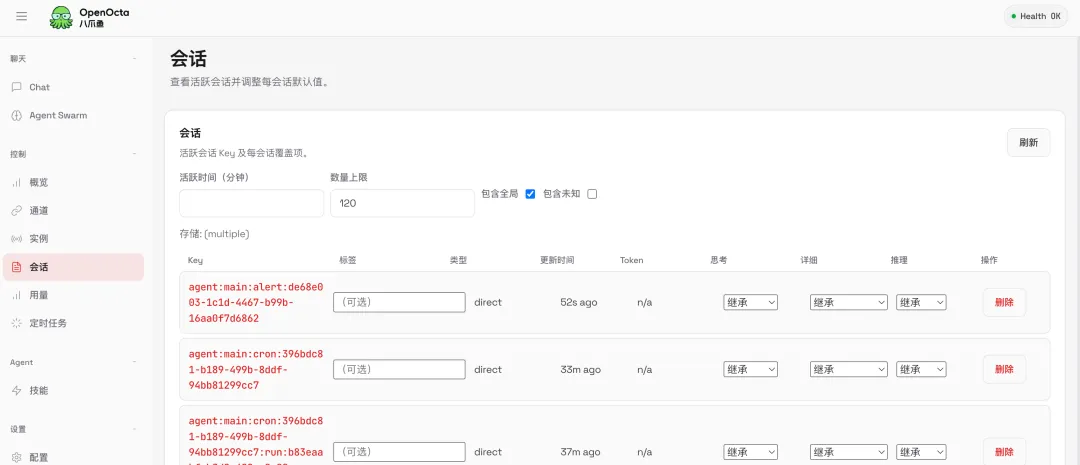
新增了一个sessionKey包含alert的key,点击后,可以看到接收告警后,调用工具,查询指标的分析对话内容
04
OpenOcta配置告警消息渠道-飞书
Prometheus alert告警格式比较固定,无法在发送的时候进行修改,无法在发送到OpenOcta的时候携带额外的发送渠道,使用模型,以及think程度等内容,这里可能需要对告警内容处理一下。
4.1 告警内容预处理
这里提供一个简单的python脚本对prometheus告警预处理,处理后进行转发到OpenOcta的/hooks/agent 接口
import uuid
import requests
from flask import Flask, request, jsonify

app = Flask(__name__)

# 目标 Webhook 配置
TARGET_URL = "http://localhost:18900/hooks/agent"
# OpenOcta Gateway 的 Webhook Token
TOKEN = "9fbe5742732ad7762201408cf22a97c559efc8106e616318"

@app.route('/alert', methods=['POST'])
def handle_alert():
    # 获取 Prometheus 原始告警数据
    data = request.get_json()
    if not data:
        return jsonify({"error": "Invalid request data"}), 400

    # 构造 OpenOcta 接收的负载参数
    session_key = f"hook:email:msg-{str(uuid.uuid4())[:8]}"
    headers = {
        "Authorization": f"Bearer {TOKEN}",
        "Content-Type": "application/json"
    }
    payload = {
        "message": data,
        "name": "prometheus alert",
        "sessionKey": session_key,
        "wakeMode": "now",
        "deliver": True,
        "channel": "feishu",
        "to": "oc_eaea5e4fdfaxxxxxx",  # 飞书机器人会话ID
        "thinking": "low"
    }

    # 转发告警至 OpenOcta
    try:
        response = requests.post(TARGET_URL, json=payload, headers=headers, timeout=10)
        response.raise_for_status()
        return jsonify({"status": "success", "data": response.json()}), 200
    except Exception as e:
        return jsonify({"error": str(e)}), 500

if __name__ == '__main__':
    app.run(host='0.0.0.0', port=5000, debug=True)
4.2 查看告警分析和消息推送
触发告警后,查看接收到告警后的分析过程会话:
’ fill=‘%23FFFFFF’%3E%3Crect x=‘249’ y=‘126’ width=‘1’ height=‘1’%3E%3C/rect%3E%3C/g%3E%3C/g%3E%3C/svg%3E)
分析完后,同步信息到飞书:
’ fill=‘%23FFFFFF’%3E%3Crect x=‘249’ y=‘126’ width=‘1’ height=‘1’%3E%3C/rect%3E%3C/g%3E%3C/g%3E%3C/svg%3E)
【OpenOcta】
git地址:https://github.com/openocta/openocta
觉得不错,给我们点个Star吧
【互动有奖】
你在使用Prometheus 时还踩过哪些“坑”?是告警配置还是容量规划?欢迎在评论区分享你的经历,我们将抽取一位幸运读者,赠送周边礼品 一份!
[#Prometheus](javascript: [#OpenClaw运维](javascript:;)[#OpenOcta](javascript:;)[#开源运维智能体](javascript: